The fridge temperatures, written down. By whoever took them, when they did.
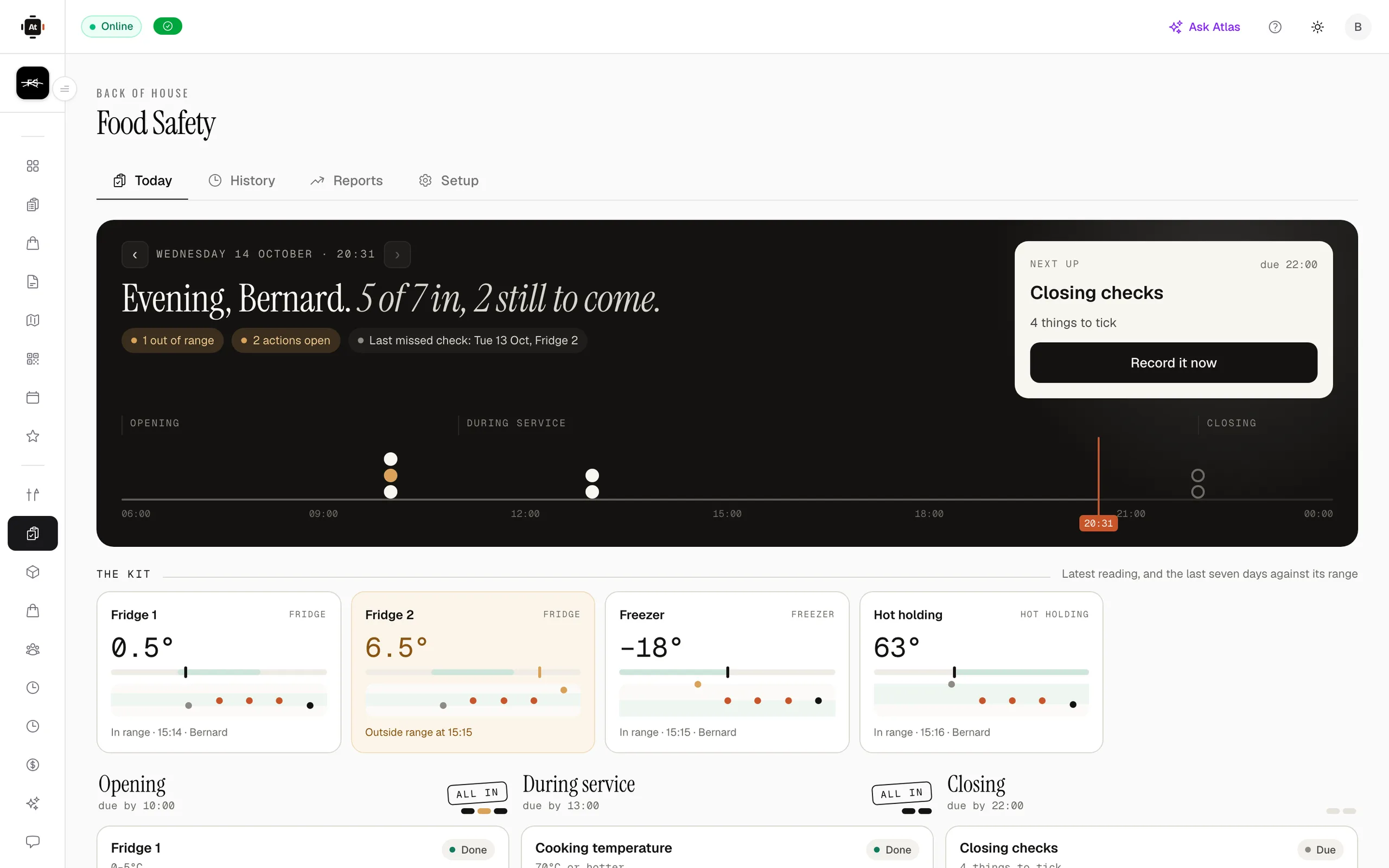
Your daily kitchen checks — fridges, freezers, cooking and hot holding, opening and closing — recorded on the kitchen screen or when someone clocks in, against the ranges your own food safety plan sets. When a check is missed, a manager hears about it during service, not at the next inspection.
- Recorded under each person’s PIN
- Overdue checks alert a manager
- Growth plan and above
Build the rota, publish it once, and know who did what on the floor.
- Start from the list you already keepTake a ready-made set of opening, fridge, freezer, probe, cooking, hot-holding, closing and cleaning checks and change it to suit, or upload the sheet on the wall and Atlas drafts the checks from it for you to approve. The ranges are yours; every suggested one says where it came from.
- Recorded by the person who did itA reading is entered on the kitchen screen under a staff PIN, or asked for at clock in or clock out. Each one keeps who took it, when, and the range it was judged against — so changing a range later never rewrites last month.
- Out of range means what was done about itA reading outside its range asks what happened next: equipment adjusted, food moved, food thrown away. The record shows the problem and the fix side by side, which is what someone asking to see it actually wants.
- Missed checks reach a managerA check with no reading past its due time and your grace period is sent to the managers once, as one message for the venue, with one reminder if it is still open. Past days’ gaps are marked missed rather than quietly left blank.
- Signed off, kept and downloadableA manager signs the day off. History shows every check against every day, Reports show what was on time, late or missed and which checks slip, and the lot downloads as CSV. Nothing is deleted — equipment and checks are archived, because the readings name them.
From the first step to the last.
- Tue 08:55OpeningThe first person in clocks in and is asked the opening checklist and the fridge temperatures on the same screen.
- Tue 12:40Cooking temperatureThe probe reading goes in on the kitchen screen under a PIN. It is in range, so it is simply recorded.
- Tue 15:10Fridge 2 reads highOut of range. The cook moves the food, checks the fridge again, and records both against the reading.
- Tue 18:30Hot holding goes uncheckedIts due time and the grace period pass with no reading, and the managers get one message saying so.
- Tue 23:20ClosingClosing and cleaning checks are recorded at clock out, and a manager signs the day off.

Tonight, versus tonight with it on.
- Now: A clipboard by the walk-in, filled in at the end of the day from memory.
- With AtTable: Each reading entered when it was taken, by the person who took it.
- Now: A missed check is noticed when somebody asks to see the sheet.
- With AtTable: A manager hears about it the same service, while it can still be done.
- Now: “Fridge 2 was high” — and nothing about what happened next.
- With AtTable: The reading, what was done about it, and who did it, on one line.
- Now: Six months of paper in a box in the office.
- With AtTable: Every day on one screen, and a CSV to hand over when asked.
Food Safety is part of team & shifts.
It runs on the same menu, the same tables and the same bill as everything else — nothing to integrate, nothing to reconcile.
Take the order at the table, the counter or the kerb, and get it to the kitchen.
Know what sold, what almost sold, and what caused the difference.
Put tomorrow’s checks on it.
Take the ready-made set or upload your own list, name your fridges, and the first day is scheduled. Food Safety comes with Growth and Enterprise; drafting checks from an uploaded list uses AI credits.
45 days to go live · 21 days free once you're live · No card required · No minimum term