

What you ordered, what arrived, what you were billed.
An order changes on its way to being paid. A line gets substituted, half of it turns up, a price moves between the quote and the invoice. AtTable keeps the three documents together and compares them, so a difference is something you find on Monday morning rather than at the year end.
- One order per supplier
- Prices recorded at delivery
- No tolerance on a difference
What it does
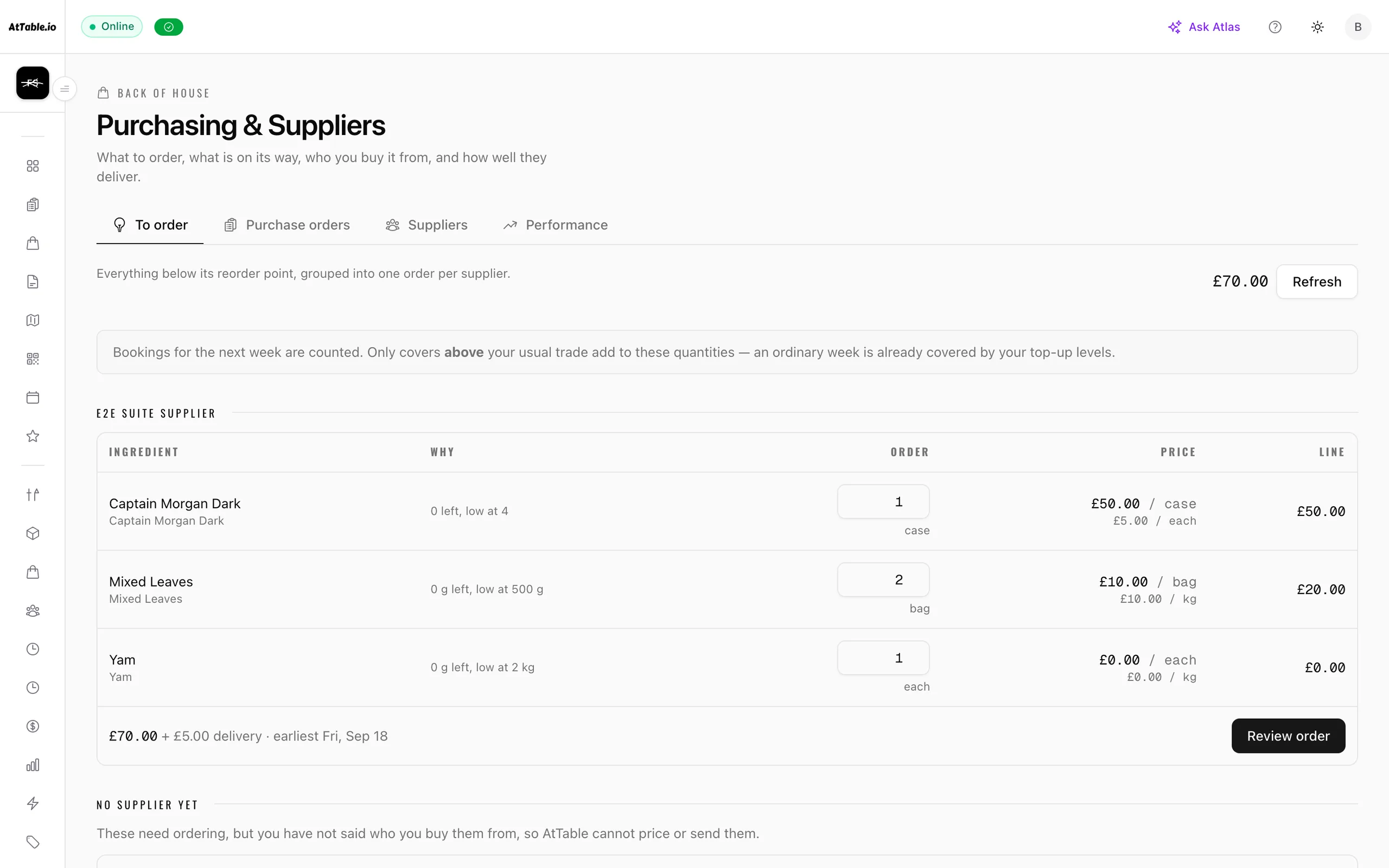
Compare what you ordered, what arrived, and what you were billed for.
- Orders a supplier can answer
- One purchase order per supplier, sent as a link. They accept, amend or price it without an account, and they never see your stock, your top-up levels, or the reasoning that produced the quantity — a suggested quantity plus a known par level is your shelf, by arithmetic.
- Deliveries as they really arrive
- Sign for what came off the van, including a delivery in two halves and a line the supplier swapped for something else. Short and substituted lines go on the shelf as what arrived, so stock is never carrying goods that were never there.
- The receipt is the price
- A purchase order records what a supplier quoted; the receipt records what they charged. Every charged price joins an append-only series, and the ingredient costs behind your dishes are read from it.
- The invoice, checked
- What you owe is accepted quantities at agreed prices. Priced higher, priced lower, billed for more than arrived, billed for nothing that came, billed for something never ordered, and arrived-but-never-billed are each named, with the difference in pounds.
- No tolerance, ever
- There is no threshold below which a difference is treated as fine. That would be inventing a policy your venue never set — the screen reports what it found and you decide what is worth a phone call.
- Your suppliers, on a page
- Each one with its own catalogue, delivery days, cut-off time and the weekday you order on — so “can I still get that for Friday?” is answered by the card rather than by ringing them.
- A side of it for them
- Suppliers get their own view of the orders you send: accept, amend or price a line, and mark what went on the van. They never see your stock, and a venue that would rather keep it to email can — the link works either way.
- Who actually delivers
- Fill rate, lateness and price movement per supplier, built from your own orders rather than a rating anybody can game.
See it
Example data
You send the purchase order
Three lines, at the prices in their catalogue. It goes as a link — the supplier answers it without an account, and never sees your stock or your reorder levels.
- £80.00——
Chicken supremes
20 kg @ £4.00
- £60.00——
Ribeye
10 kg @ £6.00
- £60.00——
Rapeseed oil
4 × 5 L @ £15.00
Owed£180.00
How it runs
In order
- Tue 16:20
The order goes out
Grouped by supplier, at the prices in their catalogue, on the ordering day you set for them.
- Tue 17:05
They answer it
Accepted as sent, or amended. If they never answer and simply deliver, the order can be marked confirmed by phone rather than sitting open forever.
- Thu 07:18
You sign for what came
Fifteen kilos against twenty ordered. The shelf gets fifteen, and the charged prices go into the series.
- Mon 09:40
The bill is read against both
Stored exactly as sent, including a header total that disagrees with its own lines. The difference is computed from the three documents each time it is opened, so correcting a receipt re-answers the question.
What changes
Tonight, versus tonight with it on
- A short delivery is noticed at the door and forgotten by the weekend.
- It is on the receipt, and the invoice is checked against the receipt.
- A price rise is spotted months later, if at all.
- The charged price joins a series the first time it is paid.
- Invoices are paid because they arrived, not because they were right.
- You pay for what you accepted, at the price you agreed.
- Orders live in WhatsApp threads and nobody can reconstruct one.
- Order, response, delivery, receipt and invoice sit on one trail.
Where it sits
One system, five pillars
Supplier control is part of suppliers.
Compare what you ordered, what arrived, and what you were billed for. It runs on the same menu, the same tables and the same bill as everything else here — nothing to integrate, nothing to reconcile.
Cost the menu on what you are actually paying for the food.
Stock & purchase orders
Know what sold, what almost sold, and what caused the difference.
Dish reviews · Revenue & attribution · Analytics · AI insights · Guest intelligence · Automated messaging · Experiments · Discounts & promotions · Campaigns
Take the order at the table, the counter or the kerb, and get it to the kitchen.
QR ordering · Digital menus · Live orders · Kitchen display · Guest payments · Dish recommendations · Sage AI waiter
Fill the diary — and give a forgotten table a chance to be sold again.
Bookings & events
Build the rota, publish it once, and know who did what on the floor.
Team & shifts